symbol: and location:. The usual causes are a typo or a wrong capital letter, a variable used outside the block it was declared in, a missing import, or a method the type doesn’t have.The message is better than it looks. It already tells you what the compiler was looking for. You only need to know how to read it.
We compiled every example below with javac on Java 21 before writing it down. The messages are copied from those runs.
How to read the message
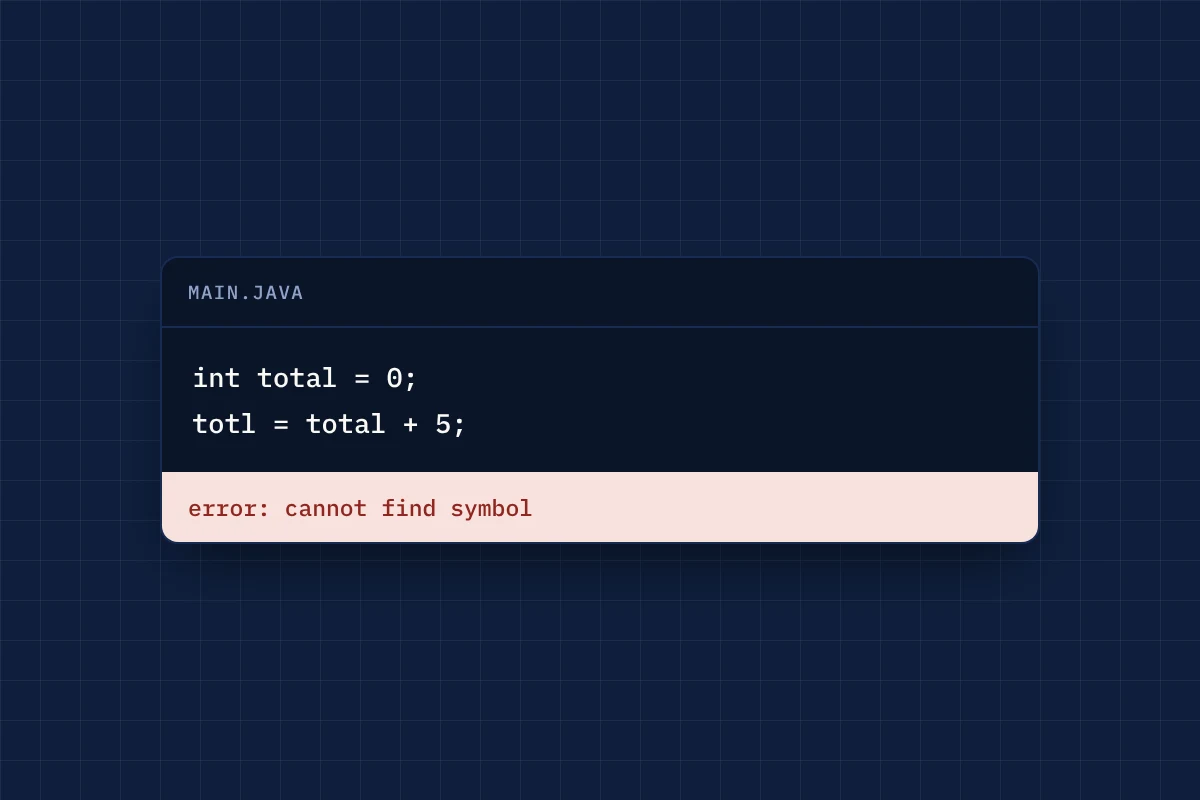
Main.java:4: error: cannot find symbol
        totl = total + 5;
        ^
  symbol:   variable totl
  location: class Main
There are four parts.
Main.java:4is the file and the line number.- The caret (
^) points at the exact name the compiler could not find. symbol:says what kind of name it is, and repeats it. This is the line that matters most.location:says where the compiler was looking.
| The symbol line says | The compiler was looking for | Check first |
|---|---|---|
symbol: variable totl | A variable or field with that exact name | Spelling, capital letters, and where it was declared |
symbol: method addall(int,int) | A method with that name and those argument types | The method’s spelling, and what the type really offers |
symbol: class Scanner | A class or other type | A missing import, the spelling, or a file the compiler can’t see |
The 8 causes
1. A typo or a wrong capital letter
Java treats total, Total and totl as three different names. Oracle’s Java tutorial puts it in four words: “Variable names are case-sensitive.”
int total = 0;
totl = total + 5;
System.out.println(Total);int total = 0;
total = total + 5;
System.out.println(total);The same applies to types. Writing string label gave us symbol: class string, because the type is String.
2. A variable used outside its block
A variable exists only inside the braces where it was declared. The Java language specification says the scope of a local variable declared in a block “is the rest of the block”. After the closing brace, the name is gone.
for (int i = 0; i < 3; i++) {
    int sum = i * 2;
}
System.out.println(sum);
System.out.println(i);int sum = 0;
for (int i = 0; i < 3; i++) {
sum += i * 2;
}
System.out.println(sum);This catches people with if blocks and try blocks too. If you need a value after the block, declare the variable before it.
3. A variable used before it is declared
The declaration has to come first.
count = count + 1;
int count = 0;int count = 0;
count = count + 1;4. A missing import
Scanner and ArrayList are not available automatically. They live in the java.util package, and you have to say so.
public class Main {
    public static void main(String[] args) {
        Scanner in = new Scanner(System.in);
        ArrayList<String> names = new ArrayList<>();
    }
}import java.util.ArrayList;
import java.util.Scanner;
public class Main {
public static void main(String[] args) {
Scanner in = new Scanner(System.in);
ArrayList<String> names = new ArrayList<>();
}
}Oracle’s tutorial lists three ways to use a class from another package: “Refer to the member by its fully qualified name”, “Import the package member”, or “Import the member’s entire package”. For homework, the second is the usual choice.
Those two lines produced four errors for us, two for each class. That is normal. Fix the import and all four go away.
5. The wrong way to ask for a length
Strings, arrays and lists each do it differently, and mixing them up is one of the most common versions of this error.
| Type | Correct | Wrong | The symbol line |
|---|---|---|---|
String | name.length() | name.length | symbol: variable length |
| Array | scores.length | scores.length() | symbol: method length() |
ArrayList | list.size() | list.length() | symbol: method length() |
A string’s length is a method, so it needs brackets. An array’s length is what Oracle’s tutorial calls “the built-in length property”, so it has none.
6. A misspelled method name
static int addAll(int a, int b) {
    return a + b;
}

public static void main(String[] args) {
    System.out.println(addall(2, 3));
}System.out.println(addAll(2, 3));Read the symbol line closely here. It shows the argument types the compiler was looking for, (int,int). A method’s name and its parameter types together are what Oracle’s tutorial calls “the method signature”.
7. A missing “new”
Without new, Java reads the class name as a method call.
String s = String("hi");String s = new String("hi");8. A class the compiler can’t see
If the symbol line says class Student and Student is your own class, the compiler did not find its file.
- The file has another name. Oracle’s tutorial says to put a class in a file “whose name is the simple name of the type and whose extension is .java”. We put
Studentin a file calledPupil.java. CompilingMain.javaon its own failed withsymbol: class Student. - The file is in another folder. The
javacdocumentation says that when no class path is given, it uses theCLASSPATHsetting if there is one, “or else the current directory”. A class somewhere else is invisible unless you tell the compiler where it is. - Not every file was compiled. Compiling everything together, with
javac *.java, fixed our misnamed file case. - The package doesn’t match. An
importfor a package that isn’t there gave us a second message as well:package school does not exist.
The same thing happens with a method. Calling s.getGrade() when Student only has getName() gave us symbol: method getGrade() with location: variable s of type Student. The location line tells you which class to open.
list.addFirst(x) and you named the method addFront, the grader reports “cannot find symbol”, and the file named in the message is the test, not yours. Copy method names from the assignment exactly. More in our guide to why code works locally but fails the autograder.Errors that look similar and aren’t
We produced each of these while testing. Each one means something different, and the fix is different.
| Message | What it means |
|---|---|
incompatible types: String cannot be converted to int | The method exists. You passed the wrong type. |
method square in class Main cannot be applied to given types | The method exists. You passed the wrong number of arguments. |
name has private access in Student | The field exists. It is private, so only its own class can use it. |
package system does not exist | You wrote system.out with a small s. It is System.out. |
variable count might not have been initialized | The variable is declared. It was never given a value. |
A fix order that works
- Start with the first errorOne mistake can cause several messages. Fix the top one and compile again before reading the rest.
- Read the symbol lineIt tells you whether the compiler wants a variable, a method or a class.
- Check the spelling, letter by letterCompare the name with its declaration. Capital letters count.
- Find the declarationIs it above this line? Is it inside the same braces?
- For a class, check the import and the fileIs there an
import? Does the file name match the class name? Is the file in this folder? - For a method, open the typeLook at what the class really offers. Check the name and the argument types.
Still stuck?
Send us your files and the compiler output. A senior engineer finds the cause, fixes it and explains why it broke, so you can explain it too. On our debug my code page, a single bug or error message is typically $45–$70, usually the same day.
Related: Java homework help, data structures homework help and code review before you submit. New to the language? Start with what Java does.
Questions about this error
What does cannot find symbol mean in Java?
It means the compiler met a name it has no declaration for at that point in your code. The name can be a variable, a method or a class. The symbol line under the error says which name, and the location line says where the compiler was looking.
Why do I get cannot find symbol when the variable is declared?
Usually because it is declared somewhere the failing line can’t see. A variable declared inside a loop or an if block stops existing at the closing brace. A different capital letter, or a declaration further down the method, causes the same message.
How do I fix cannot find symbol class Scanner?
Add an import for java.util.Scanner at the top of the file, above the class declaration. The Scanner class lives in the java.util package and is not available until you import it.
Is cannot find symbol a compile error or a runtime error?
It is a compile error. The compiler reports it before the program runs, so you see it when you build, not when you run.
Why does javac say cannot find symbol for a class in the same folder?
Check that the file name matches the class name exactly, with the same capital letters, and that the file is really in the folder you are compiling from. Compiling all the files together is a quick way to rule out a file that was left out.
Why do I get several cannot find symbol errors for one mistake?
Because the compiler reports every place it could not resolve the name. A missing import produces an error each time the class is used. Fix the first error, compile again, and most of the others usually disappear.
Sources
- The Java Tutorials: variables, arrays and defining methods
- The Java Tutorials: using package members and managing source and class files
- The Java Tutorials: common problems and their solutions
- The Java Language Specification, chapter 6: names
- The javac command
- Java API: String and Scanner
Upload the prompt and see a predicted budget in under a minute. A senior engineer confirms the final price.